Build and Run Loops like Fortune 500 Engineers
A practical guide to loop engineering with the four loop types, core primitives, and 49 ready-to-use operating snippets and production artifacts.
What is a loop?
The Claude Code team defines a loop as an agent that repeats a cycle of work. The agent stops when it meets a stop condition. Each loop has a trigger, a stop rule, and a primitive. Each loop fits a different type of task.
Addy Osmani describes the same change from the builder's view. In loop engineering, you do not prompt the agent yourself. You design a system that prompts the agent for you. He calls a loop a recursive goal. You set the goal. The AI repeats the work until it meets the goal.
Peter Steinberger said: "You shouldn't be prompting coding agents anymore. You should be designing loops that prompt your agents."
Boris Cherny, who leads Claude Code at Anthropic, said: "I don't prompt Claude anymore. I have loops running that prompt Claude and figuring out what to do. My job is to write loops."
Every prompt you send starts this cycle. You direct each turn by hand:
This guide covers what happens next. You stop directing the cycle by hand. Instead, you design the trigger, the stop rule, and the checks one time.
Anatomy of a loop
Addy Osmani describes the loop in four steps. Set a goal. Act. Evaluate the result. Feed the errors back in. Repeat until you meet a stop condition.
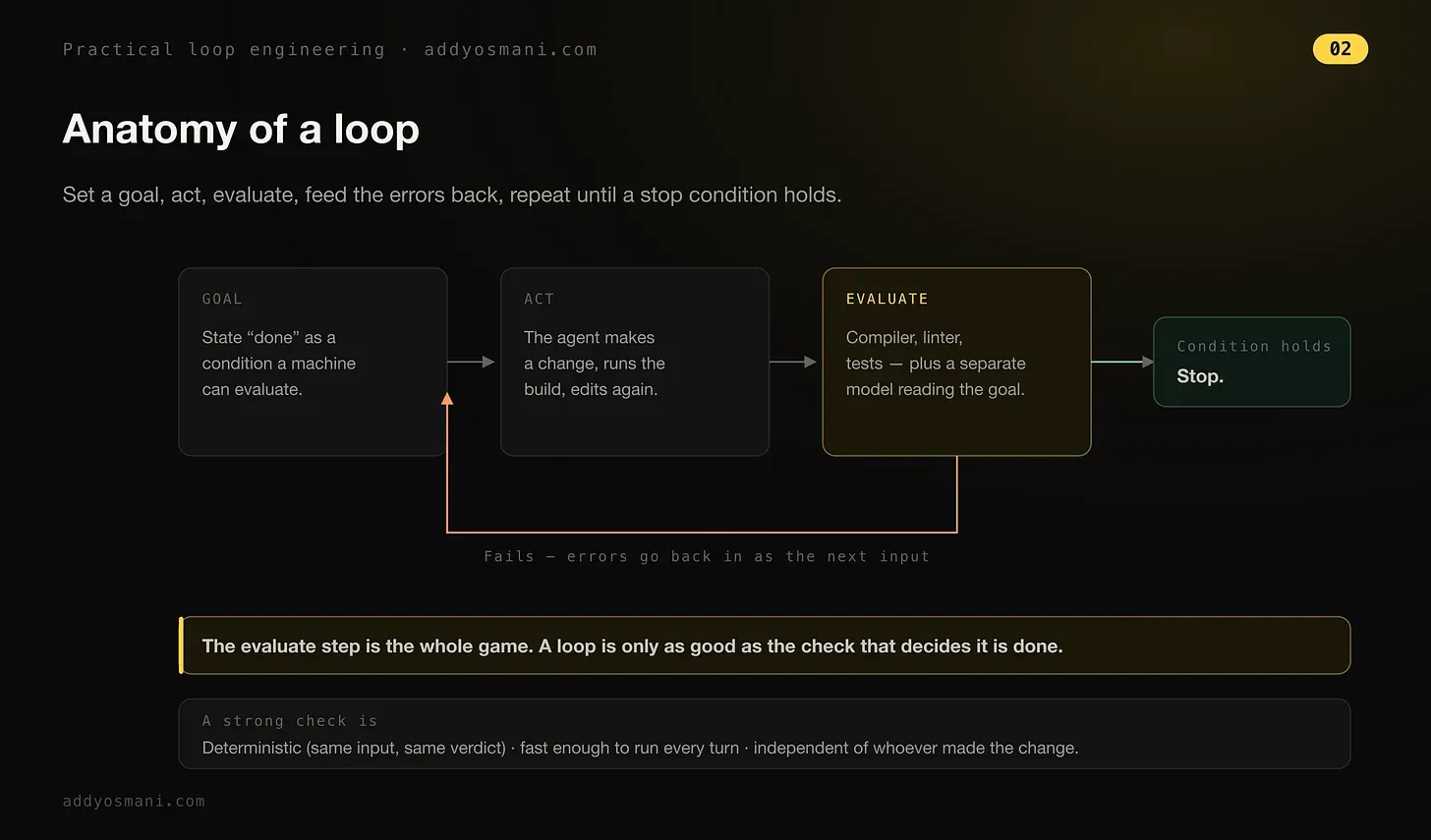
The evaluate step is the whole game. A loop is only as good as the check that decides it is done. A strong check is deterministic (same input, same verdict), fast enough to run every turn, and independent of whoever made the change.
Addy Osmani, Practical Loop EngineeringThe four loop types
Delba Oliveira wrote the Claude Code team's guide to loops. This is her list of loop types. Not all tasks need a complex loop. Start with the simplest option. Use these patterns only when you need them.
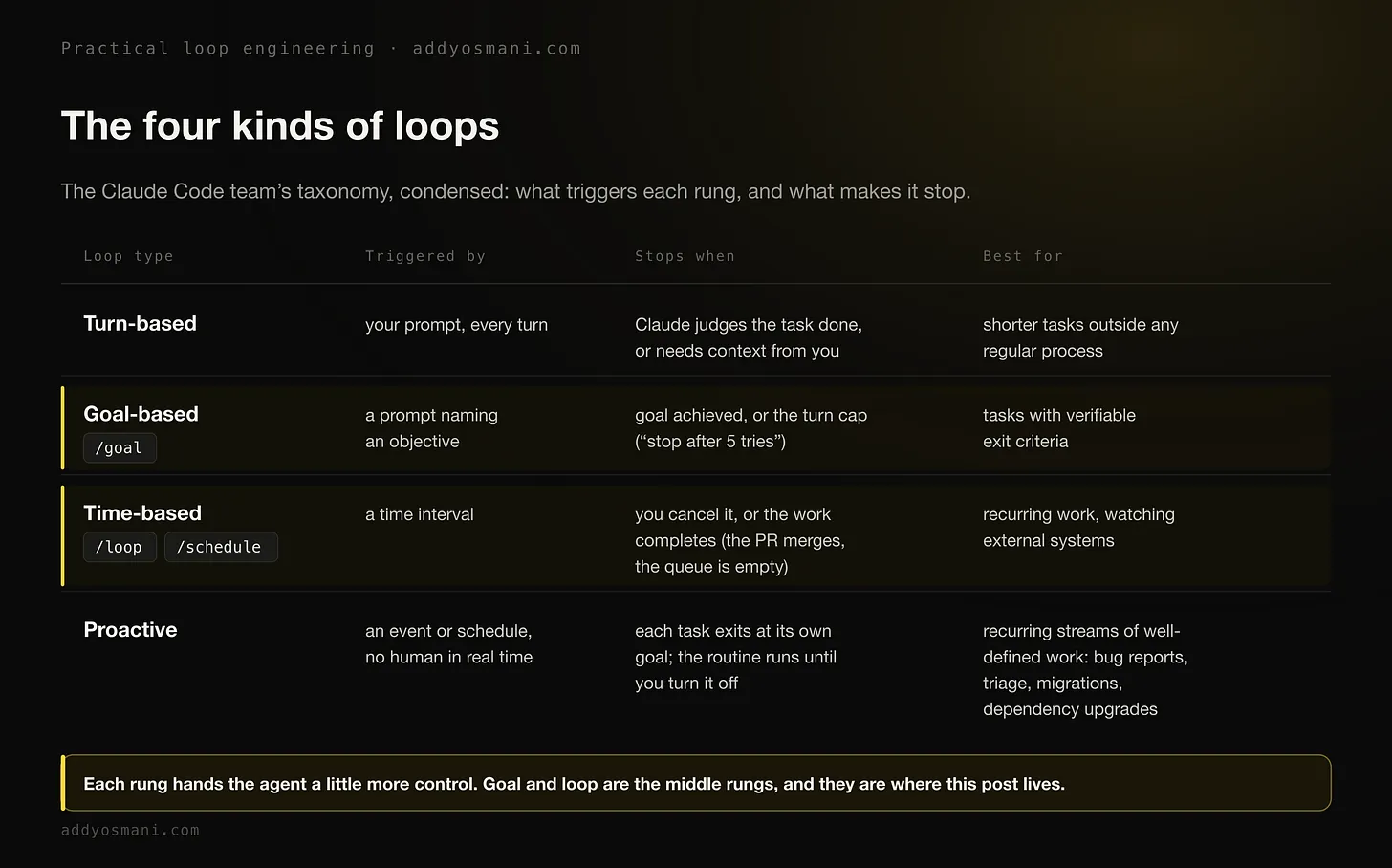
Turn-based
Delba Oliveira calls this the agentic loop. Claude gathers context. Claude takes action. Claude checks its own work. Claude repeats these steps if needed. Then Claude responds to you.
Example: you ask Claude to create a like button. Claude reads your code, makes the edit, and runs the tests. Claude then gives you work it believes is correct. You check the work by hand. You write the next prompt.
You can improve the check step. Write your manual checks in a SKILL.md file. Claude then checks more of its own work from start to end. Use checks with numbers where you can. Claude can verify these checks more easily.
---
name: verify-frontend-change
description: Verify any UI change end-to-end before declaring it done.
---
# Verifying frontend changes
Never report a UI change as complete based on a successful edit alone.
Verify it the way a human reviewer would:
1. Start the dev server and open the edited page in the browser.
2. Interact with the change directly. For a new control (button, input,
   toggle): click it, confirm the expected state change, and screenshot
   before/after.
3. Check the browser console: zero new errors or warnings.
4. Use the Chrome Devtools MCP, run a performance trace and audit
   Core Web Vitals.
If any step fails, fix the issue and rerun from step 1, do not hand
back partially verified work.
Goal-based /goal
One turn is not always enough. Complex tasks often need more turns. Use /goal to state what done looks like. Claude then keeps working until it meets that state.
Claude cannot decide the work is "good enough" and stop early. Each time Claude tries to stop, a second evaluator model checks your condition. If the condition is not met, the evaluator sends Claude back to work. This continues until Claude meets the goal or reaches the turn cap. Use a condition with a clear result, such as a passed test or a score above a set number:
/goal get the homepage Lighthouse score to 90 or above, stop after 5 tries
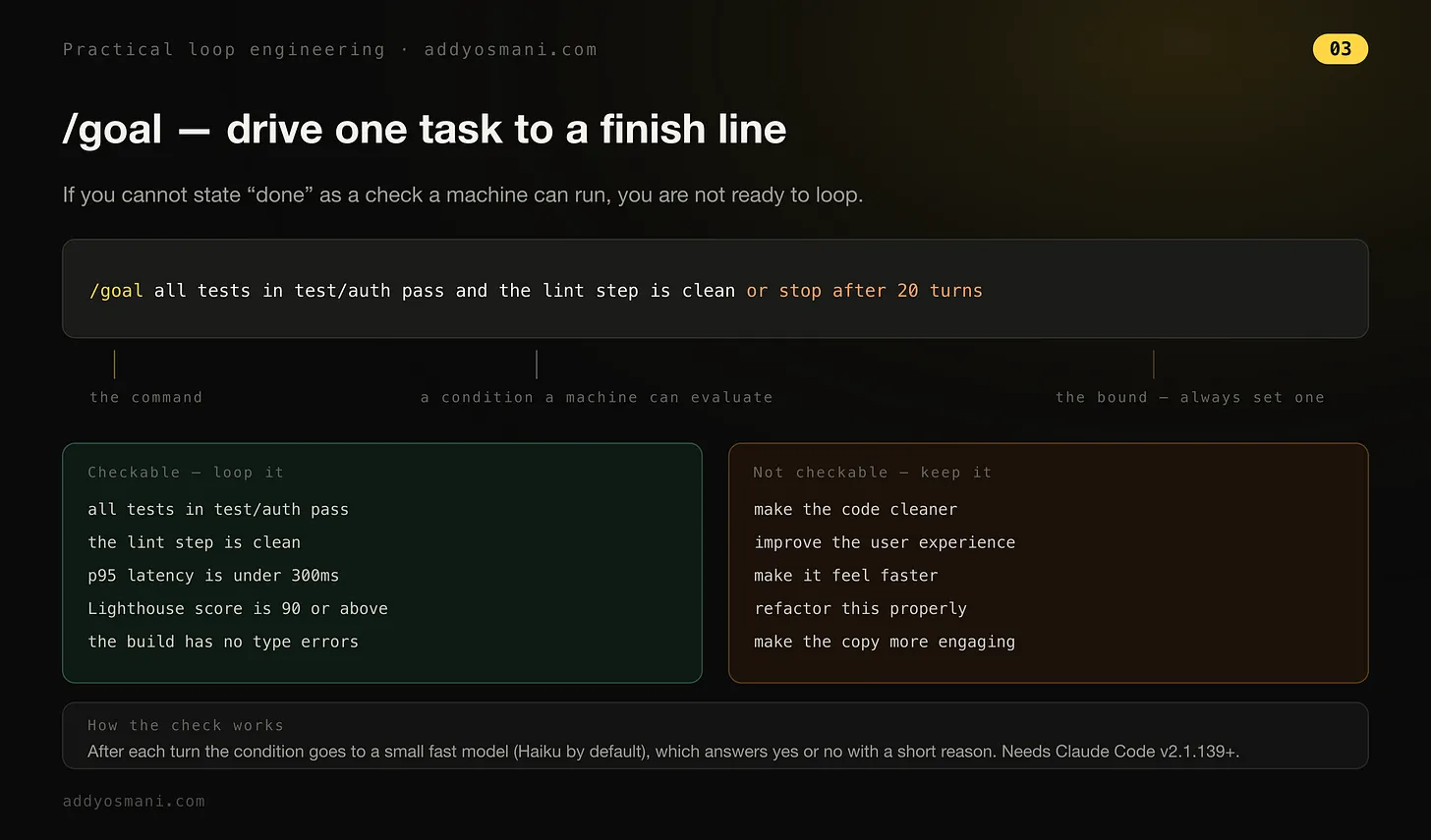
Osmani's rule: state "done" as a check a machine can run. If you cannot do this, do not use a loop yet. "All tests in test/auth pass" and "the lint step is clean" are checks a machine can run. "Make the code cleaner" and "make it feel faster" are not checks a machine can run. These goals will drift until the turn cap stops the loop.
Time-based /loop, /schedule
Some agentic work repeats. The task stays the same. Only the input changes. Example: summarize Slack messages every morning. Other work depends on outside systems. Example: a PR that may get a code review or fail CI.
The simplest way to handle this: check the system on a set interval, and react to any change. /loop runs a prompt again on this interval:
/loop 5m check my PR, address review comments, and fix failing CI
/loop runs on your computer. If you turn off your computer, the loop stops. To move the loop to the cloud, create a routine with /schedule.
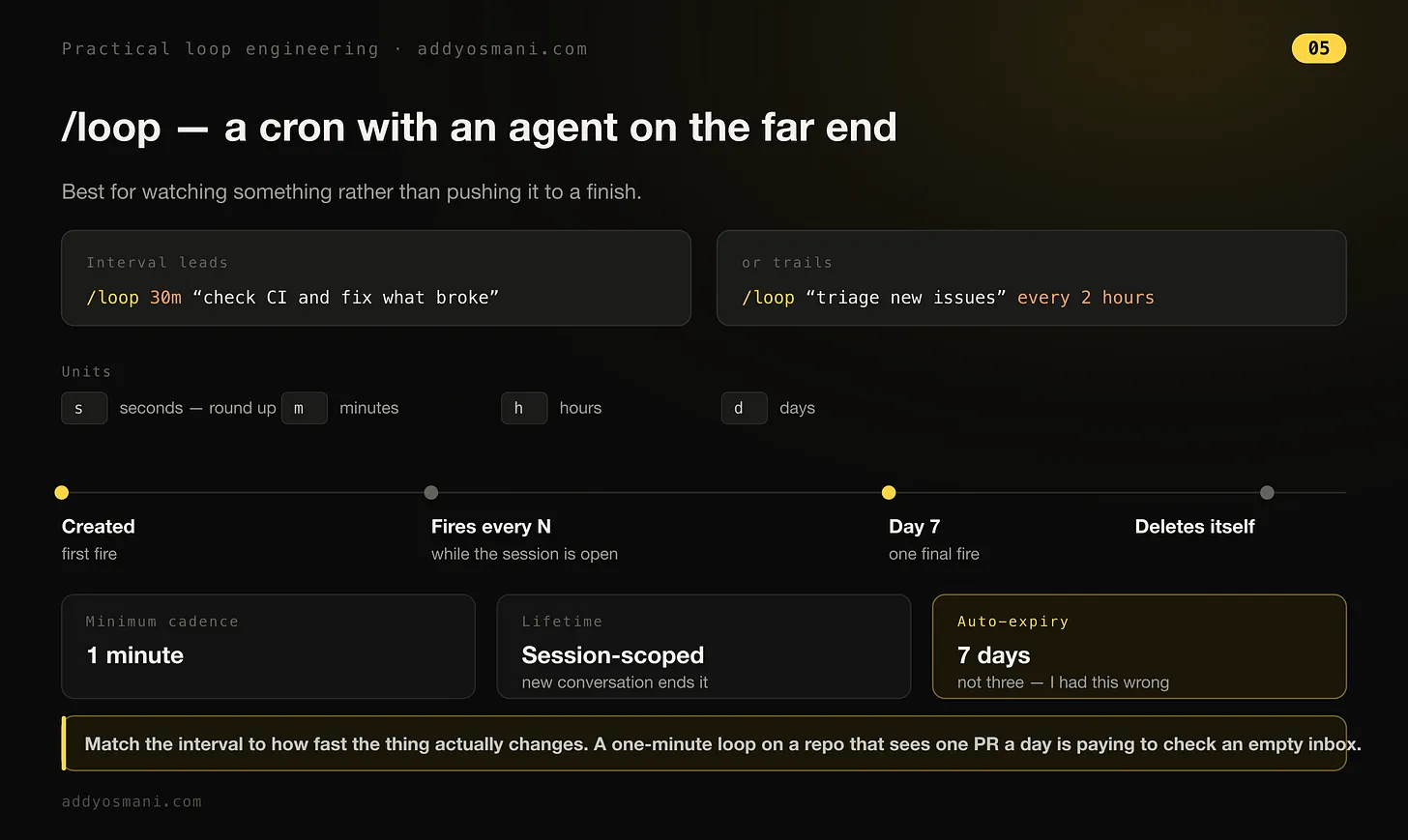
Note from Osmani: a recurring /loop stops after seven days, not three days as an earlier post stated. Set the interval to match how fast the thing you watch changes. Example: a one-minute loop on a repo with one PR each day checks an empty inbox most of the time. This wastes resources.
Proactive
Delba Oliveira combines the other three types for this one. Example task: handle incoming feedback. /schedule runs a routine that checks for new reports. /goal states what done looks like. Skills document how to verify each fix.
Dynamic workflows direct agents to triage each report, fix it, and review the fix. Auto mode lets the routine run without a stop for your permission. Combined, this looks like:
/schedule every hour: check the project-feedback channel for bug
reports. /goal: don't stop until every report found this run is
triaged, actioned, and responded to. When fixing a bug, use a
workflow to explore three solutions in parallel worktrees and have
a judge adversarially review them.
The building blocks of a loop
Addy Osmani's view: a loop needs five things, plus one place to store data. Tool names differ. Each primitive does the same job in every tool.
Automations: a loop's heartbeat
An automation is what makes a loop a loop, not one run you did one time. In the Codex app, you pick the project, the prompt to run, the frequency, and where it runs: your local checkout or a background worktree. A run that finds a problem sends it to a triage inbox. A run that finds no problem archives itself.
Osmani cites OpenAI's own internal use as an example: daily issue triage, CI failure summaries, commit briefings, and searches for bugs added the prior week. An automation can call a skill. This keeps the recurring task easy to maintain, not a wall of instructions nobody updates.
In Claude Code, an automation can be a scheduled task, a cron job, /loop, a hook fired at a point in the agent lifecycle, or GitHub Actions if the loop must keep running after you close your laptop.
Worktrees, so parallel doesn't turn into chaos
When you run more than one agent, files start to collide. Two agents that write the same file cause the same problem as two engineers who commit to the same lines without talking first.
A git worktree fixes this. A worktree is a separate working directory on its own branch. It shares the same repo history. One agent's edits cannot touch another agent's checkout. In Claude Code, this means the git worktree command, a --worktree flag to open a session in its own checkout, and an isolation: worktree setting on a subagent. Each helper agent then gets a fresh checkout that removes itself when done.
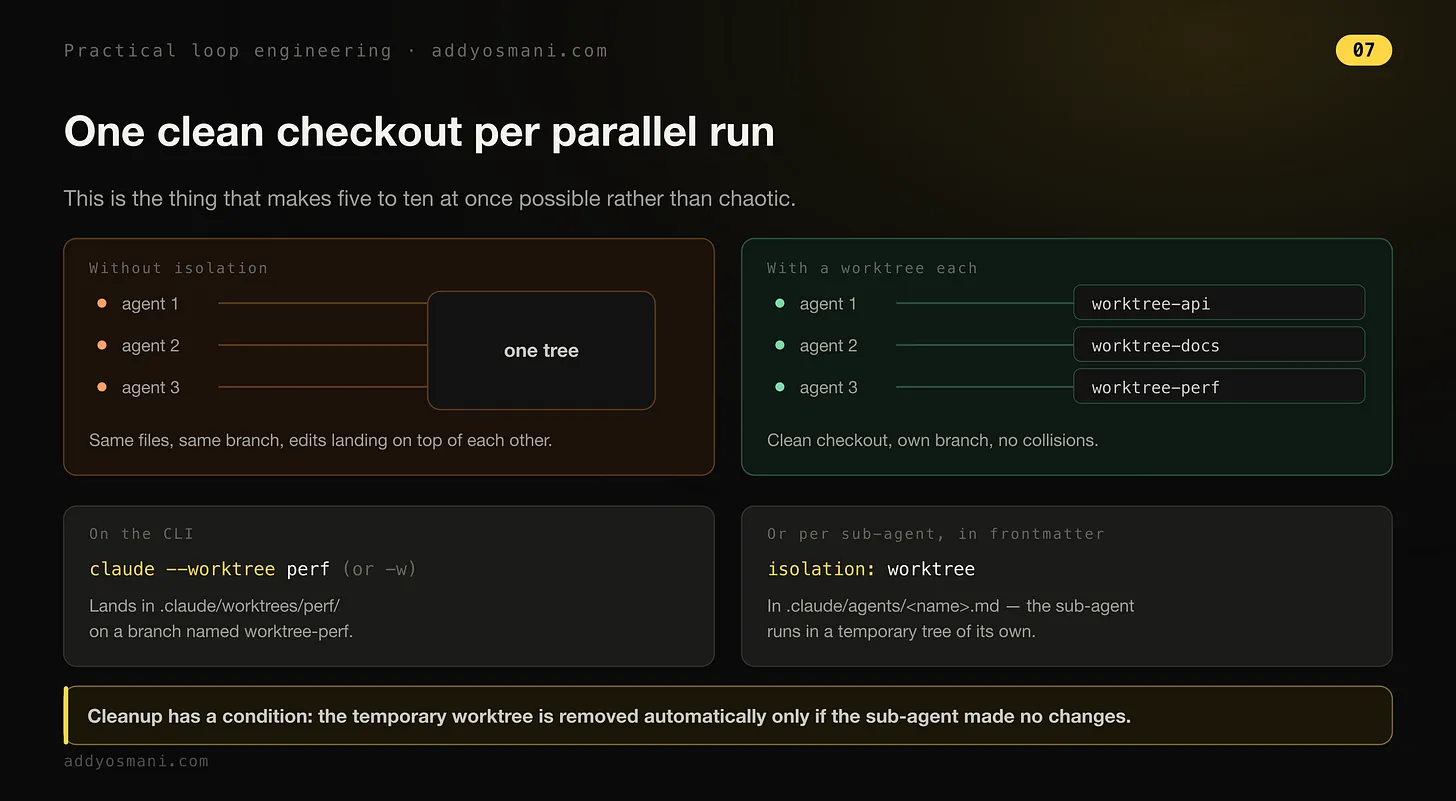
Osmani runs five to ten agents at one time. He calls worktrees the reason this stays orderly, not chaotic. Worktrees remove the file collision problem. But you are still the limit: your review time sets how many agents you can actually run, not the tool.
Skills, so you stop explaining your project every time
A skill stops you from re-explaining the same project context each session. Codex and Claude Code use the same format: a folder with a SKILL.md file inside. The file holds instructions and metadata. The folder can also hold scripts, references, and assets.
Each agent session starts cold. The agent fills any gap in your intent with a confident guess. A skill writes that intent down one time, outside the session: your conventions, your build steps, and the reason you avoid a certain approach.
Without skills, the loop re-derives your whole project from zero each cycle. With skills, the loop builds on what it already knows.
Plugins & connectors, the loop touches your real tools
A loop that sees only the filesystem is a small loop. Connectors are built on MCP. A connector lets the agent read your issue tracker, query a database, call a staging API, or post a message in Slack.
A plugin bundles connectors and skills together. A teammate installs your full setup in one step instead of rebuilding it from memory. This is the difference between an agent that tells you the fix, and a loop that opens the PR, links the ticket, and posts to the channel once CI passes, by itself.
Sub-agents, keep the maker away from the checker
The most useful structural choice in a loop is this: split the agent that writes the code from the agent that checks it. The model that wrote the code grades its own work too kindly. A second agent, with different instructions and sometimes a different model, catches errors the first agent missed.
The common split: one agent explores, one agent implements, one agent verifies the result against the spec.
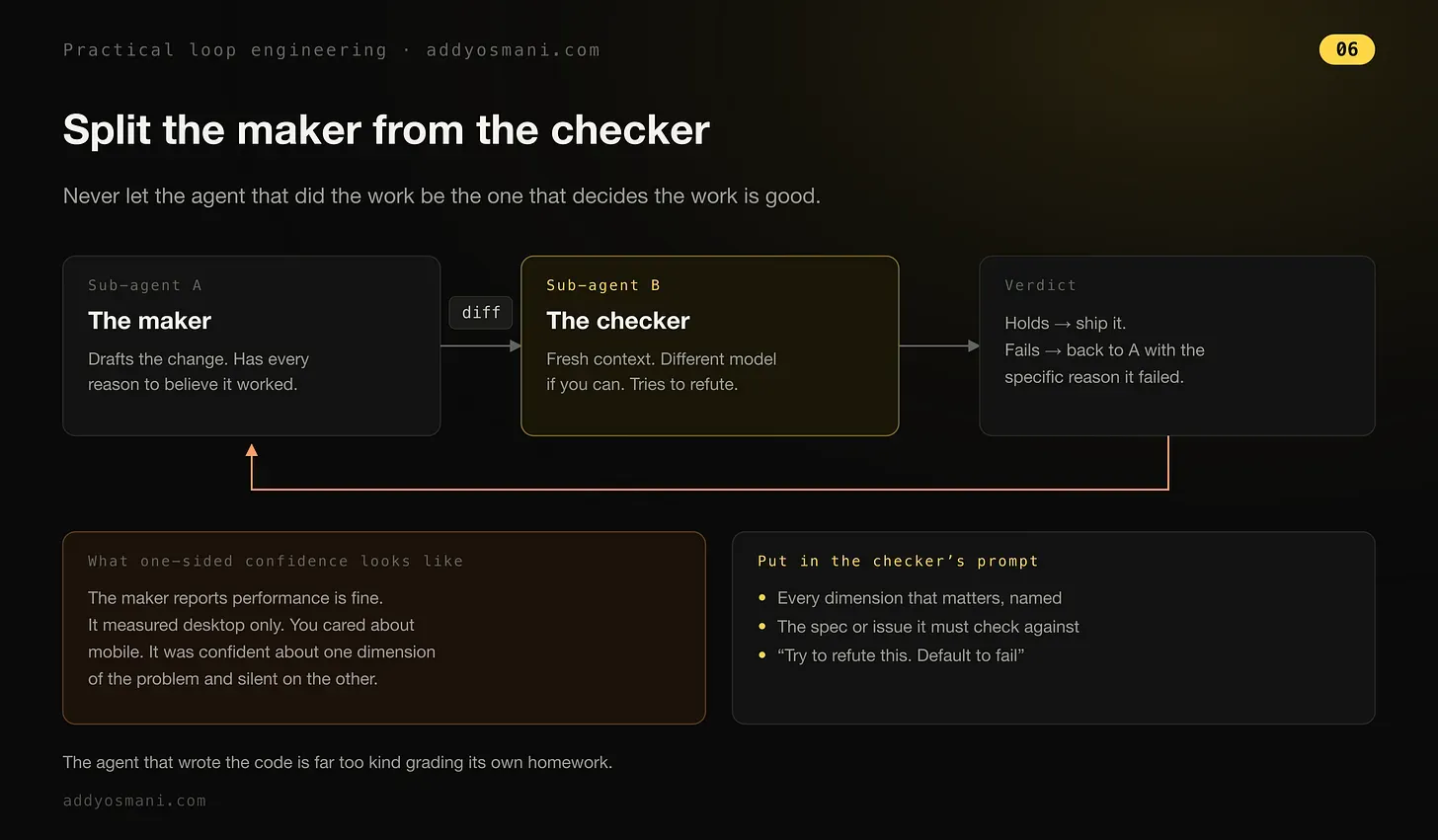
Osmani learned this from a real failure. A maker agent reported performance as fine, but it measured only desktop performance. The real problem was on mobile. The agent was confident about one part of the problem, and said nothing about the other part.
/goal uses the same split. A fresh model decides if the loop is done, not the model that did the work. This applies the maker-checker split to the stop condition itself.
Memory, the one place that remembers
Memory can be a markdown file or a Linear board. It is anything that exists outside one conversation and stores what is done and what is next. This may sound small, but every long-running agent depends on it.
The model forgets everything between runs. Memory must live on disk, not in the conversation context. The agent forgets. The repo does not forget.
Choose your loop
This is the Claude Code team's summary table. It comes from Delba Oliveira's guide to getting started with loops:
| Loop | You hand off | Use it when | Reach for |
|---|---|---|---|
| Turn-based | The check | You're exploring or deciding | Custom verification skills |
| Goal-based | The stop condition | You know what done looks like | /goal |
| Time-based | The trigger | The work happens outside your project on a schedule | /loop, /schedule |
| Proactive | The prompt | The work is recurring and well-defined | All of the above, and dynamic workflows |
To start, look at your current work. Pick one task where you are the bottleneck. Ask which part you can hand off. Can you write the check? Is the goal clear enough? Does the work arrive on a schedule?
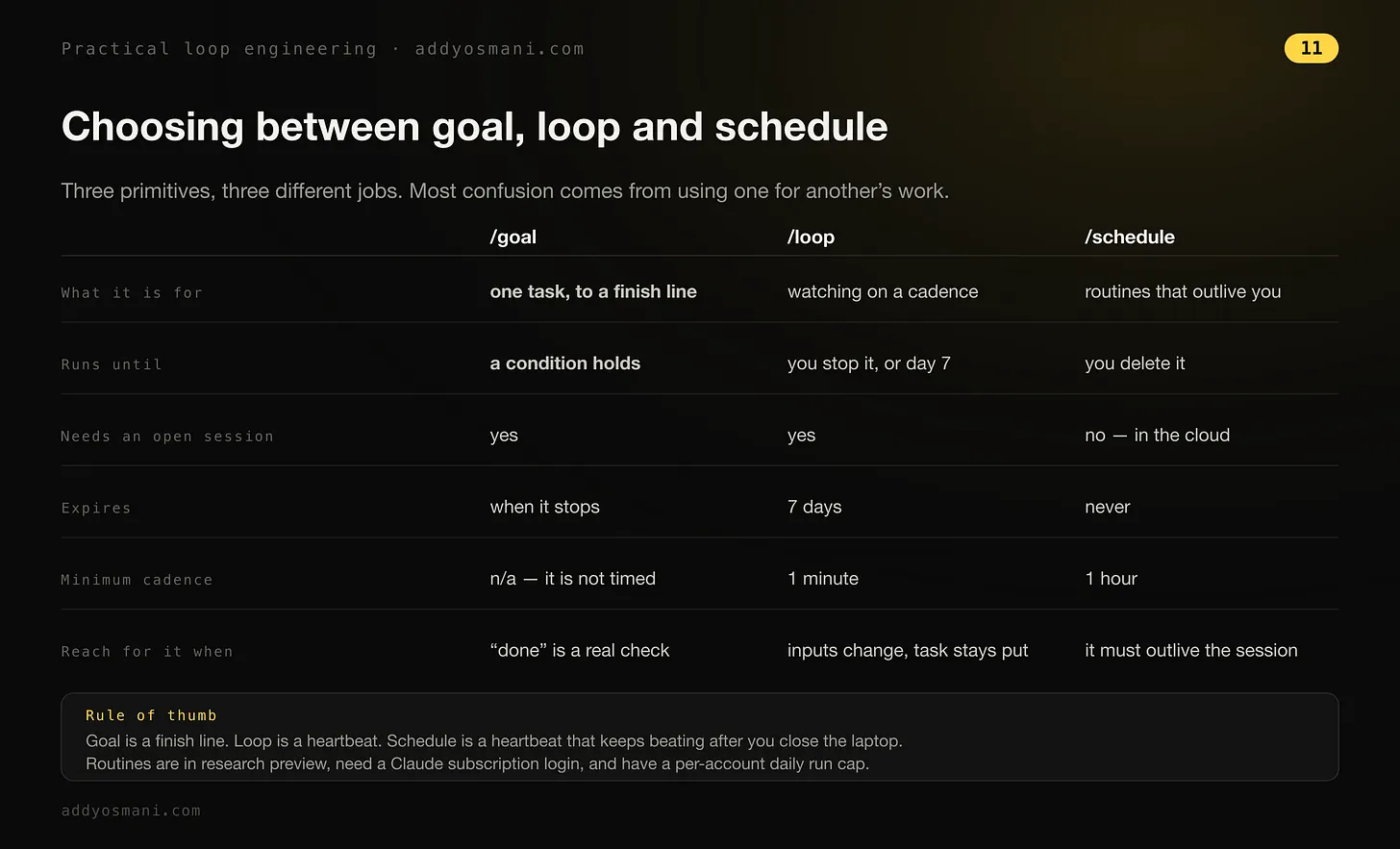
Osmani's rule for the three primitives above: goal is a finish line. Loop is a heartbeat. Schedule is a heartbeat that keeps beating after you close your laptop. /goal and /loop both need an open session. /schedule runs in the cloud, but it is still in research preview. It needs a Claude subscription login, and it has a daily run limit per account.
Maintaining quality and token usage
Delba Oliveira's guide ends with two rules for running loops: keep the code quality high, and manage token usage.
Maintaining code quality
The quality of a loop's output depends on the system around it. When you design the system, do this:
- Keep the codebase clean: Claude follows the patterns and conventions that already exist in your codebase.
- Give Claude a way to check its own work: write skills that state what good work looks like for you and your team.
- Make docs easy to find: frameworks and libraries with current docs lead to better results.
- Use a second agent for code reviews: a reviewer with fresh context has less bias. It is not swayed by the first agent's reasoning. Use the built-in
/code-reviewskill or Code Review for GitHub.
When one result does not meet your standard, do not just fix that one result. Update the system so future runs meet the standard too.
Managing token usage
To manage token usage, set clear limits on each loop:
- Choose the correct primitive and model for the job: small tasks do not need multiple agents or loops. Some tasks can use cheaper, faster models.
- State clear success and stop criteria: state exactly what done looks like. This helps Claude reach the solution sooner, but not too soon.
- Test on a small scale before a large run: dynamic workflows can start hundreds of agents. Check usage on a small part of the work first.
- Use scripts for work with a fixed set of steps: a script costs less than reasoning through each step. Example: a PDF skill can ship a form-filling script. Claude runs the script each time instead of writing the code again.
- Do not run routines more often than needed: set the interval to match how often the thing you watch actually changes.
- Review your usage:
/usageshows recent usage by skill, subagent, and MCP./goalwith no arguments shows the number of turns and tokens used so far./workflowsshows each agent's token usage. You can stop any agent at any time.
What one loop looks like
Addy Osmani combines the primitives into one shape he reuses often. An automation runs on the repo each morning. Its prompt calls a triage skill. The skill reads the prior day's CI failures, the open issues, and the recent commits. The skill writes its findings to a markdown file or a Linear board.
For each finding, the loop opens an isolated worktree. The loop sends a sub-agent to draft the fix. A second sub-agent reviews that draft against the project skills and the existing tests.
Connectors let the loop open the PR and update the ticket. Anything the loop cannot handle goes to a triage inbox. The state file is the spine of the process. It stores what was tried, what passed, and what is still open. Tomorrow's run picks up where today's run stopped.
You designed this loop one time. You did not prompt any single step. This is Steinberger's point in practice. The loop works the same way in Codex or in Claude Code, because the pieces are the same in both tools.
What a loop doesn't do for you
Addy Osmani's warning: the loop changes the work. It does not remove you from the work. Three problems grow sharper as the loop improves, not easier.
- You are still responsible for verification. A loop that runs unattended is also a loop that makes mistakes unattended. Split the verifier sub-agent from the maker sub-agent. This gives the loop's "it's done" real meaning. Even then, done is a claim, not proof. Your job is to ship code you have confirmed works.
- Your understanding still rots if you allow it. The faster the loop ships code you did not write, the larger the gap grows between what exists and what you understand. This gap is comprehension debt. A smooth loop makes the gap grow faster, unless you read what the loop wrote.
- The comfortable choice is often the risky choice. When the loop runs itself, you may stop forming an opinion and accept whatever it returns. Osmani calls this cognitive surrender. Designing the loop with judgment is the cure. Designing the loop to avoid thinking is the cause. Same action, opposite result.
Build the loop. But build it like someone who intends to stay the engineer, not just the person who presses go.
Addy Osmani, Loop EngineeringWhen not to use a loop
A loop is not always the correct choice. Use a loop when the task repeats and you can state a clear exit condition.
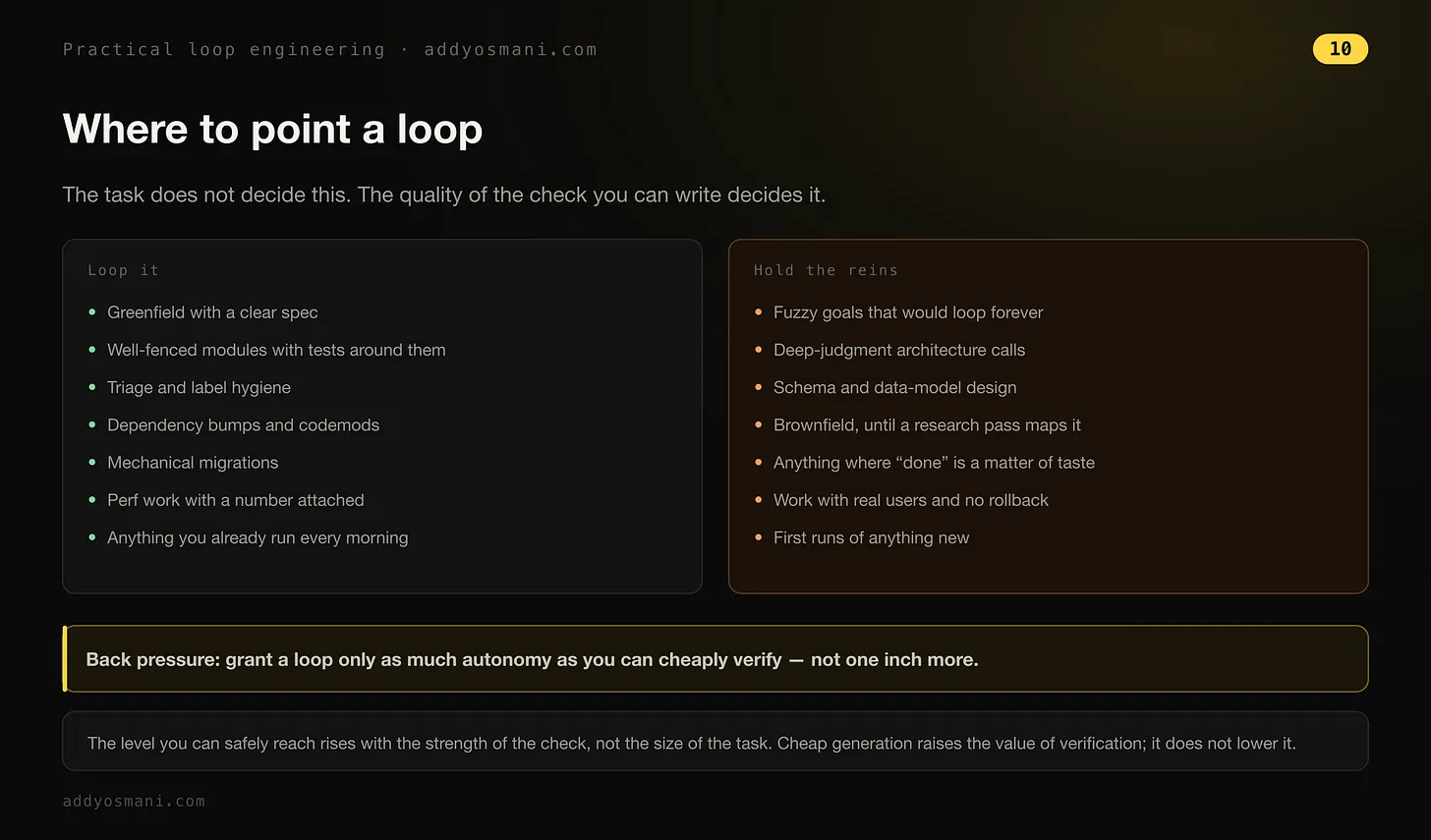
Osmani's point: the task type does not decide this. The quality of the check you can write decides this. Give a loop only as much freedom as you can verify at low cost. Do not give it more freedom than that. A stronger check lets you safely give the loop more freedom, not a larger task. Cheap generation raises the value of verification. It does not lower the value of verification.
Delba Oliveira gives the same warning in her own words: not all tasks need a complex loop. Tasks that need human taste, subjective design choices, or open, creative exploration do not fit any of the four loop types above.
Once you pick a place to start, run the loop. Watch the results. Watch for where the loop stalls or goes too far. Iterate on the loop as needed.
How the toolkit is structured
This toolkit has two resource layers. One fixes local failure modes inside a run; the other operationalizes loops as systems.
Operating snippets
Snippets are the fast path. Use them when you already know the loop type and want a clause, prompt, skill, template, or diagnostic that fixes one failure mode.
- Best for tightening one run or one workflow
- Organized by loop type and lifecycle stage
- Small enough to copy directly into prompts or skills
Production artifacts
Artifacts are the systems layer. Use them when the loop needs schedules, worktree isolation, handoffs, state files, reviewers, hooks, or deployment-ready scaffolding.
- Best for recurring or proactive loops
- Organized by primitive, not by failure stage
- Larger templates meant to operationalize the loop
Toolkit in practice
Here is what composition looks like when you take one recurring engineering problem and build the smallest loop that can be trusted to handle it.
Every morning, triage new bug reports, reproduce the valid ones, fix the straightforward bugs, and escalate risky or unclear cases instead of forcing them through the same loop.
- Claims a fix without reproducing the bug
- Batches too many issues into one run
- Keeps retrying ambiguous reports instead of escalating
- Lets the maker grade its own work
Proactive
The work recurs, the inputs change every run, and the loop needs durable state plus clear escalation boundaries.
It keeps the loop narrow: one issue per run, real verification, durable memory between runs, and a clear handoff whenever confidence drops.
Osmani runs this pattern on Agent Skills, his open-source repo with over 80,000 stars, where up to 90 pull requests came in a day. Before, he reviewed them by hand, one at a time. A scheduled pass now runs first: it summarizes what's new and how urgent it is, and closes what clearly doesn't fit, leaving a smaller, real pile for a person.
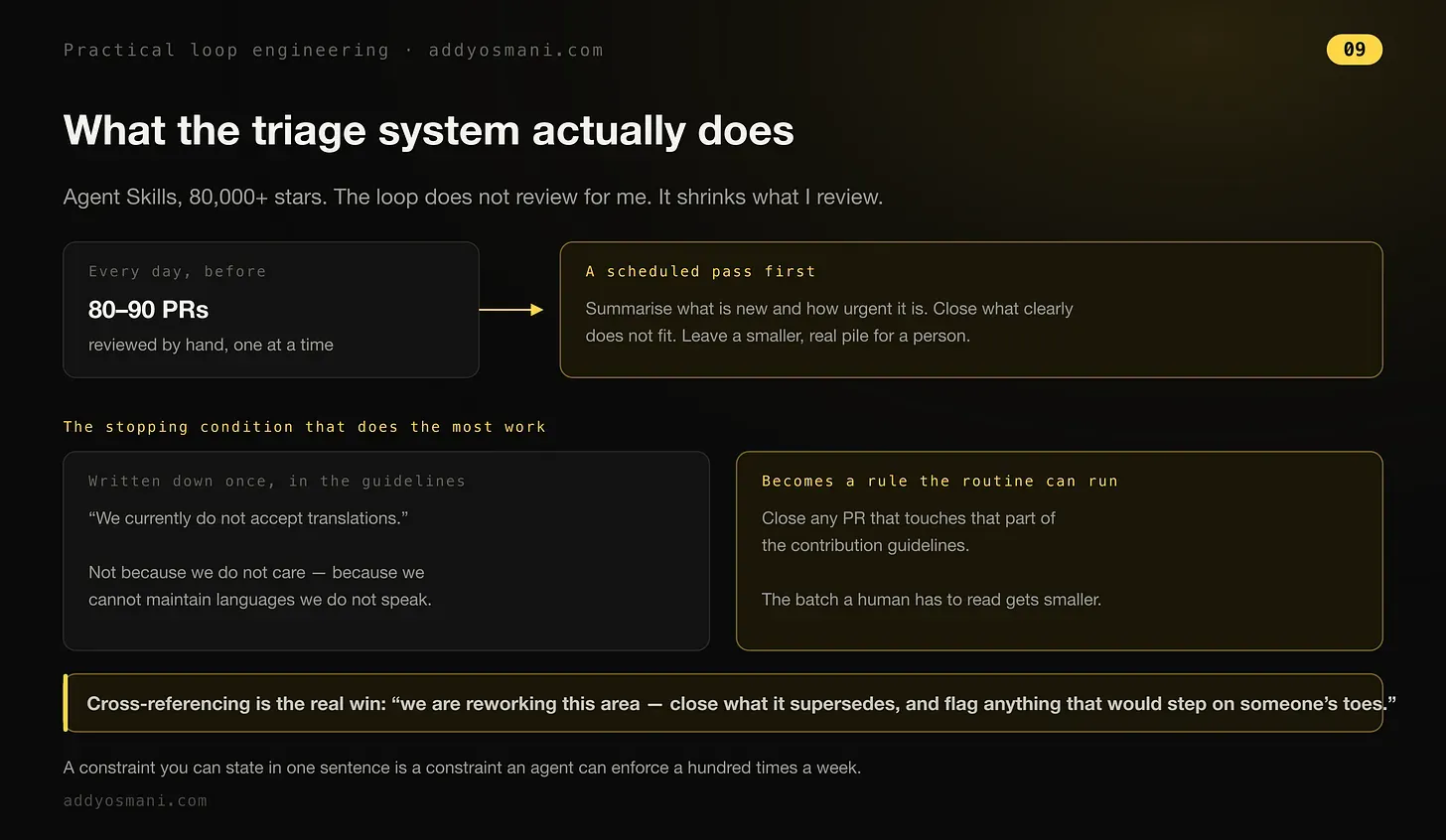
The stopping condition doing most of the work is written down once, in the contribution guidelines ("we currently do not accept translations," not because the maintainers don't care, but because they can't maintain languages they don't speak), and the routine turns that sentence into a rule it can enforce a hundred times a week. Osmani calls cross-referencing the real win: "we are reworking this area, close what it supersedes, and flag anything that would step on someone's toes."
Loop schedules the check. Goal solves the problem. The combination is where this stops being a toy and starts taking work off your desk.
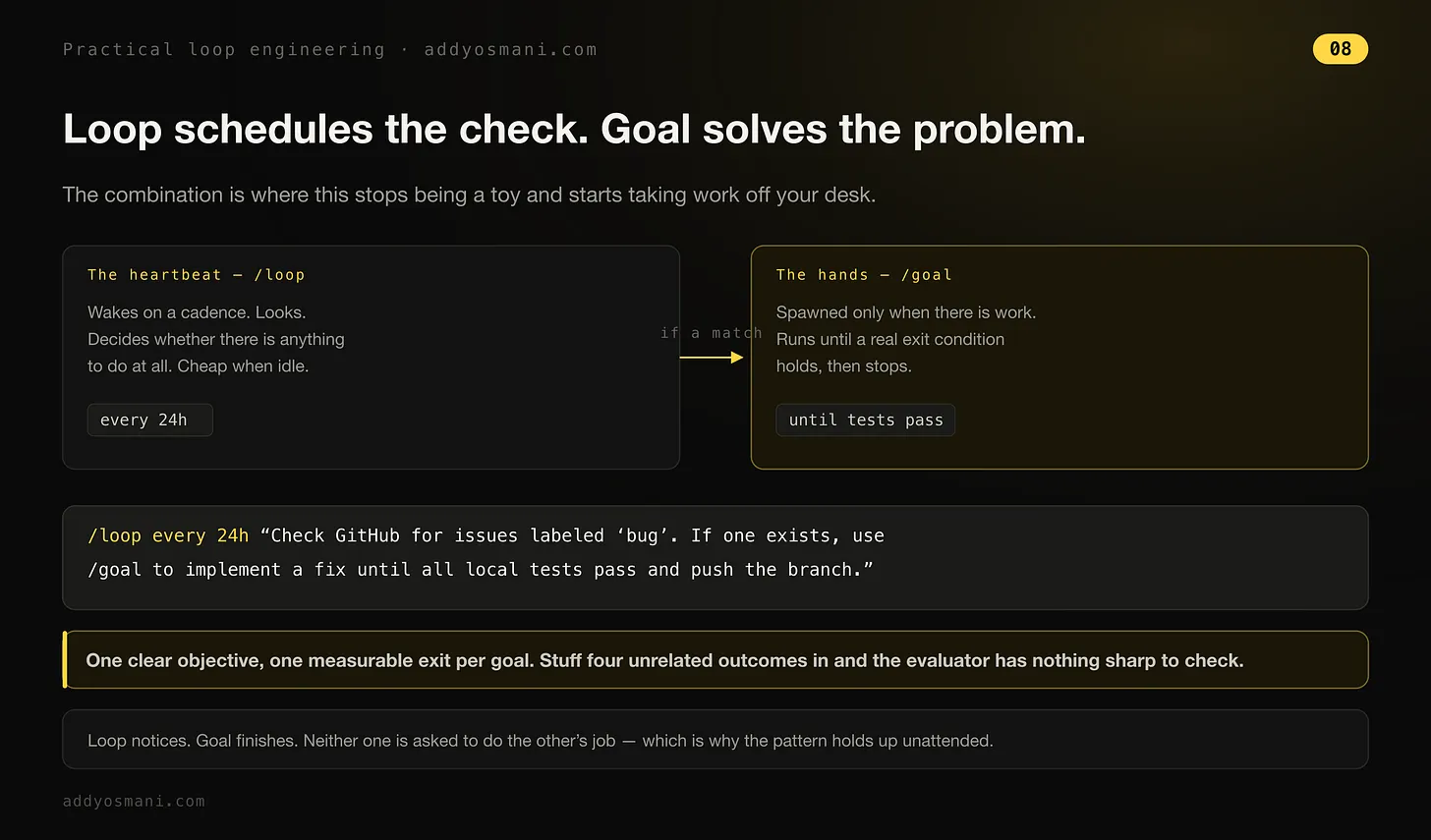
/loop every 24h "Check GitHub for issues labeled 'bug'. If one exists, use /goal to implement a fix until all local tests pass and push the branch."
One clear objective, one measurable exit per goal. Stuff four unrelated outcomes into a single loop and the evaluator has nothing sharp to check. Loop notices, goal finishes; neither one is asked to do the other's job, which is why the pattern holds up unattended.
31 ready-to-use snippets
Pick the loop type you are running (time-based, proactive, etc.) and the stage where it usually fails (setup, verification, etc.).
Based on the snippet type, you integrate it into your prompts, skill folders, audits, etc.
We recommend starting with one or two snippets that kill the most likely failure mode, rather than stacking five at once.
Short control language to drop directly into a run.
A starting template for a specific loop shape.
A reusable operating rule worth standardizing across runs.
A reporting structure that makes the loop observable.
An audit prompt for checking whether the loop still deserves to exist.
18 production-ready artifacts
Pick the primitive your loop is missing first: automation, memory, worktree isolation, connectors, sub-agents, or hooks.
Then choose the artifact that upgrades that primitive from an idea into an operating system component.
Start with the smallest artifact that solves the bottleneck you already have, not the most ambitious one on the page.
Give a loop its first durable system: state, scheduling, or isolation.
Turn one good run into a repeatable workflow with files, hooks, or automation.
Define handoffs between maker, checker, reviewer, and other agents.
Connect the loop to repos, APIs, tickets, or other systems of record.